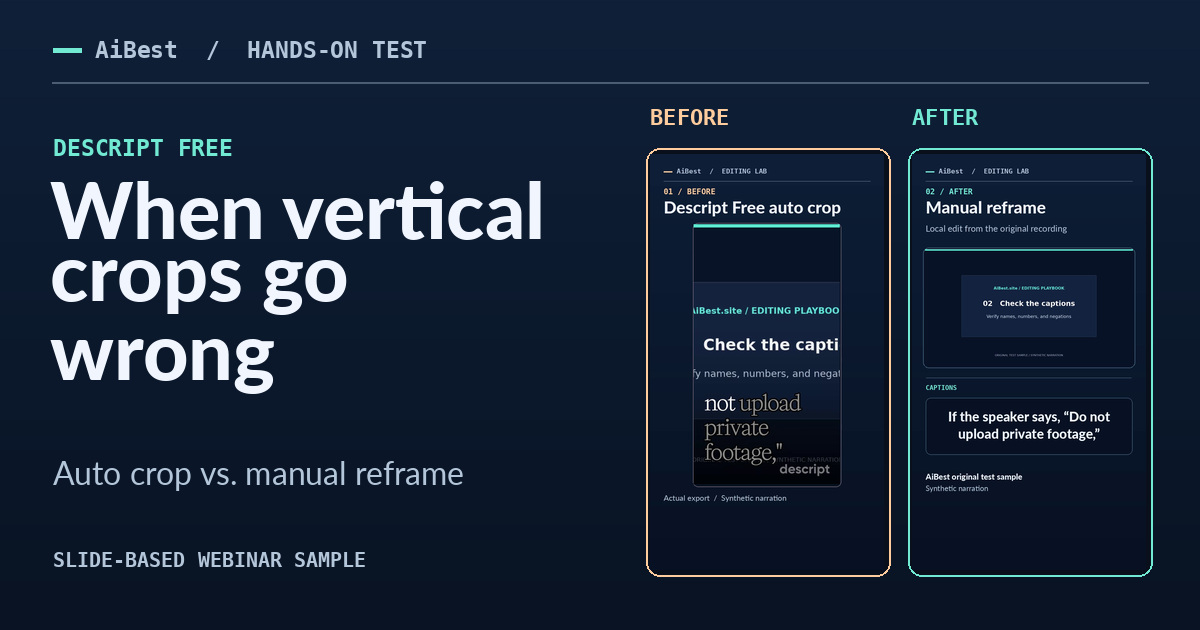
Tested November 24, 2026. Descript Free generated two portrait clips when we asked for three from a 105-second webinar-style sample. We downloaded and checked one 20.4-second MP4 (720 × 1280). It had a visible Descript watermark, and the portrait crop cut off the slide title. Treat the AI cut as a starting point, and watch the exported file before posting.
How we ran the test
We used an original AiBest recording with synthetic narration and three short editing lessons. After importing and transcribing it in Descript’s web editor, we opened AI Tools → Repurpose → Create clips, requested three clips at 22 seconds, selected a portrait layout, and submitted the request. Descript made a roughly 20-second captions clip and a 21-second hooks clip. Our workspace went from 100 to 70 AI credits in this run. That is an observation, not a fixed cost per run. We tested one short recording, not a full-length webinar, and verified one export.
Three things to check before posting
1. Listen to the first and last sentences
Start with a line that makes sense without the rest of the webinar. End after a complete thought. In our exported clip, the captioned lesson starts with “Automatic captions are a draft” and ends with “when they are spoken.” Watch with the sound on rather than assuming that the generated title tells you what made the cut.
2. Keep the slide readable on a phone
The automatic crop clipped our title, supporting text and part of the synthetic-narration label. Fit the slide inside the vertical canvas instead of filling the frame. If the text is still too small, rebuild the slide for portrait video rather than zooming in and losing words.
3. Check the captions and watermark in the actual MP4
The exported file had captions on screen and a separate subtitle track. The subtitle track preserved the key phrase “Do not upload private footage.” Check names, numbers and words like “not” against the audio. In the web editor, choose Export → Video → Local export to save a file rather than publish a Descript share page. Our free export included a visible watermark.
Is Descript Free enough for webinar clips?
It was enough to test AI clip selection and download a playable clip. For slide-heavy content, check framing and captions before relying on it. Descript lists 60 media minutes per month and 100 one-time AI credits on Free; check the plan page and your workspace before budgeting a longer project. Start with one excerpt you’re authorized to upload, especially if it contains client material. See what to check before uploading a recording or find other options in our AI tools guide for content teams.
Official references: Create clips · Local export · Plans and limits.